Organize your everyday life
Plan meals, prepare shopping lists and track expenses in one place. Start on your own or share a household.
Fair Expense Splitting
Never argue about who paid what
AI Meal Planning
Smart suggestions based on ingredients
Family Sync
Keep everyone on the same page
Everything You Need
Plan meals, prepare shopping lists and track expenses in one place. Start on your own or share a household.
AI-Powered Meal Planning
Get intelligent meal suggestions based on your ingredients and preferences. Generate weekly plans in seconds.
Nutrition Diary
Log meals and track calories, protein, carbs, and fat against your daily goals. Save meal groups to reuse later.
AI Food Scanning
Take a photo of your meal and get instant AI-powered nutrition analysis including calories and macros.
Food Barcode Scanner
Scan a product barcode to add its nutrition information to your diary, or enter the details manually.
Personalized Nutrition
Get your BMR, TDEE, and macro recommendations calculated based on your body metrics and goals.
Grocery Management
Smart grocery lists that sync across devices. Never forget anything at the store again.
QuickAdd AI
Add items to any list just by speaking. AI understands context and categorizes everything for you instantly.
AI Receipt Scanning
Snap a photo of your receipt and let AI extract the details. Automatically categorize and split expenses.
Smart Expense Splitting
Track each person's share and record repayments made outside the app.
Family Collaboration
Invite household members, assign roles, and work together. Create shared lists and calendars.
Chores Management
Assign and track household chores. Set recurring schedules and get reminders so nothing slips through the cracks.
Savings Goals
Set and track savings targets. Monitor your financial progress with beautiful charts and analytics.
Cloud Sync
All your data synced securely in the cloud. Access from any device, anytime. Included in Free plan.
Water Tracking
Stay hydrated with daily water goals, streaks, and achievements. Track your intake with quick-add buttons.
Recurring Expenses
Manage bills and subscriptions with automatic scheduling. Get reminders when payments are due.
How It Works
Start with your everyday life
Create your space
Use LifeHub on your own. Invite other people when you want to share.
Plan meals and shopping
Choose recipes, check your pantry and add missing ingredients to your shopping list.
Track your expenses
Record expenses, see your share and record repayments made outside LifeHub.
Explore detailed guides
See LifeHub in Action
A detailed look at how LifeHub simplifies your daily household management.
Set Up Your Digital Home
Create a dedicated space for your household. Whether it's a family, a couple, or roommates, LifeHub keeps everyone in sync.
- Create a secure household workspace
- Invite members via email instantly
- Manage permissions and roles

Track & Split Expenses
No more spreadsheets or awkward money talks. Log expenses as they happen and let the app handle the math.
- Log shared expenses in seconds
- Split by percentage, shares, or exact amount
- Settle up debts with one tap

Manage Household Chores
Keep your home tidy without the nagging. Assign chores, track completion, and rotate tasks automatically.
- Assign recurring or one-time chores
- Rotate tasks fairly among members
- Track completion history

Meal Planning Made Easy
Choose recipes for each day and review the ingredients you need.
- View your plan by day or week
- Organize breakfast, lunch, and dinner
- Sync with your shopping list

Feeling Hungry? Ask AI
Stuck on what to cook? Let our AI suggest recipes based on what you have in your pantry or your cravings.
- Get instant recipe ideas
- Keep pantry ingredients marked as available or needed
- Consider dietary preferences

Food Profile and Nutrition Targets
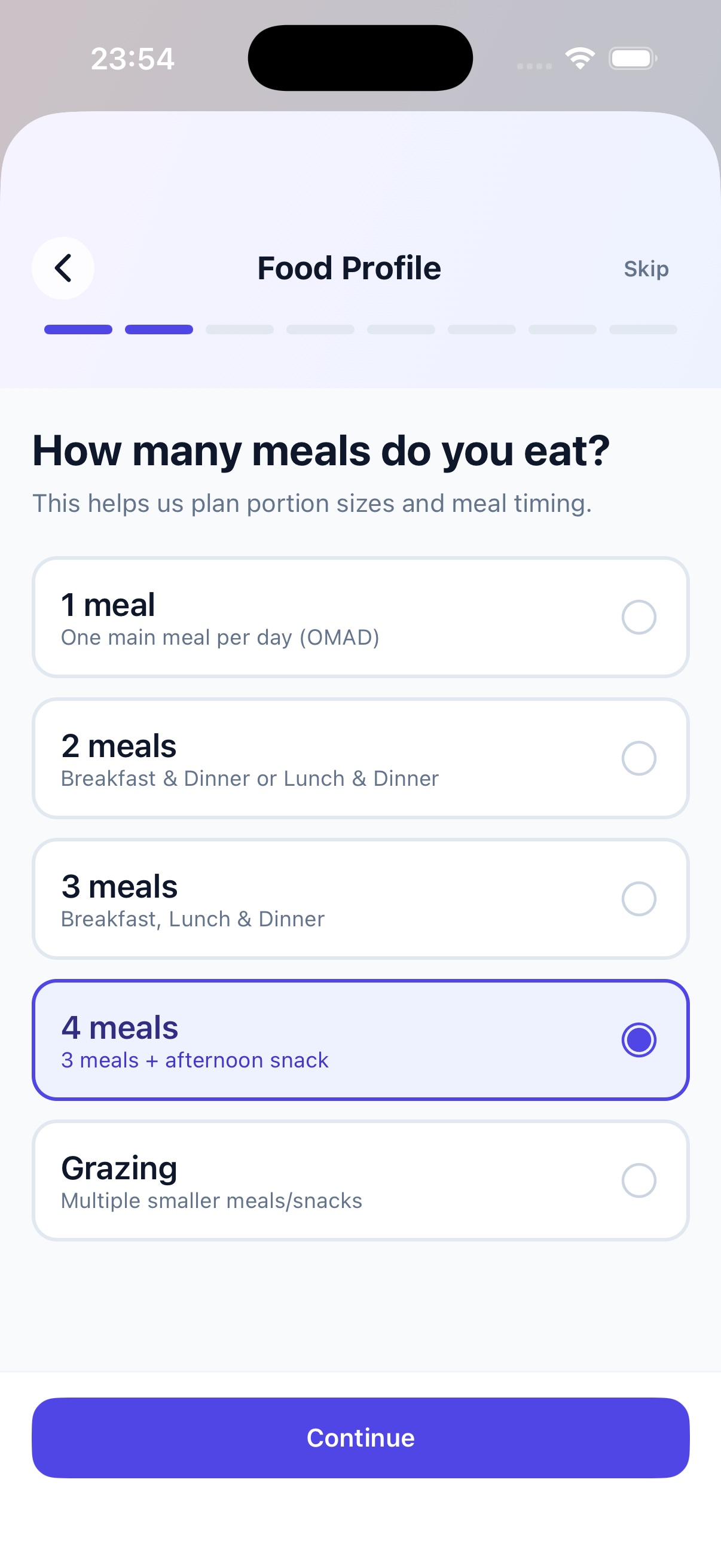
An eight-step setup asks how you eat, what you avoid and what you enjoy. LifeHub turns the answers into daily calorie and macro targets, and every meal suggestion follows them.
- Pick how many meals a day you eat, from one to grazing
- Choose your calorie focus: eating less, balanced or eating more
- Mark dietary restrictions like vegetarian, gluten-free or pescatarian
- List ingredients to avoid and the cuisines you love
- See your BMR, TDEE, calorie target, macros and daily water goal
Food Diary
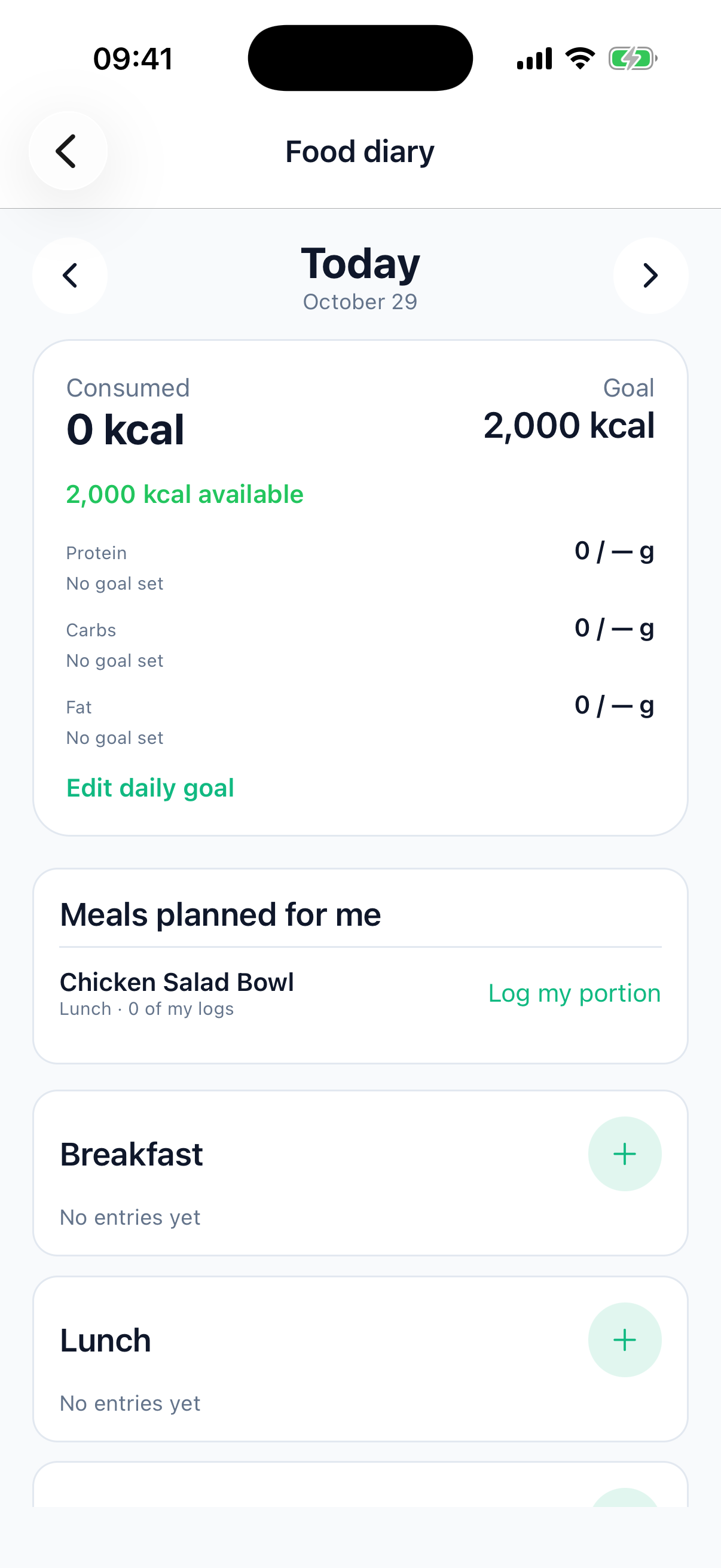
Log what you actually eat, meal by meal. The diary totals your calories and macros against the daily goal your food profile produced.
- Log food under breakfast, lunch, snack or dinner
- See calories consumed, calories left and your protein, carbs and fat
- Tap + beside a meal to add food
- Adjust the daily goal whenever it needs to change
Add with AI
Write or dictate a request and LifeHub turns it into purchases, expenses, meals, or savings.
- Use quick templates
- Create several items in one request
- Review before saving

Reach Goals Together
Visualize your shared financial future. Set concrete savings goals and track your contributions over time.
- Create custom savings goals
- Track monthly contributions
- Visualize progress with charts

Frequently Asked Questions
Have questions? We have answers.
LifeHub has a free tier. Premium prices and trial eligibility are shown in the app store before you confirm a purchase.
Track each person's share and record repayments made outside the app.
Absolutely! LifeHub is perfect for roommates. You can split rent, utilities, groceries, and other shared expenses. The app tracks everything and shows settlement amounts.
Your data is encrypted and securely stored in the cloud. LifeHub uses industry-standard security practices. You control who can access your household's information.
Check any outstanding balances before removing a member. LifeHub does not transfer money.
The AI meal planning feature is included in LifeHub Premium. It analyzes your household preferences and available ingredients to suggest delicious meals.